 Desktop Crew
A tiny crew lives on top of your windows.
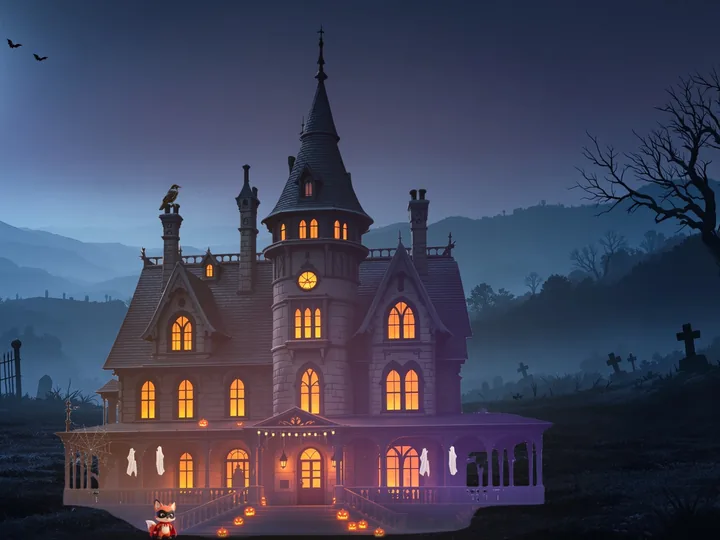
Foxes, owls and mushroom folk stand on your taskbar and the tops of your windows. They chat, nap, chase their dreams, and every month they build a new house on your desktop, from an empty plot to a holiday party.
$7.99, one payment (plus tax where applicable). 14 days free with the whole crew first.
For Windows. No account, no ads, no tracking.

Company for your desktop, and something to watch it build
Thirteen crewmates take turns on your desktop, four at a time, with a new shift every day. Each has a personality, a best friend and a dream. Drag a window and whoever's standing on it rides along. Close it and they tumble down.
They live on your windows
On the taskbar and the tops of your windows, on every monitor. Foxes trot and leap, owls waddle and fly, mushrooms toddle. Hover to meet one, click to pet, drag to pick one up.
A new house every month
Piece by piece: one crewmate fetches from the pile, a teammate passes it up, and the installer hammers it in. It goes up over about a week, then gets decorated a little each day until the party.
A party on the day
On the reveal day the finished house is floodlit in the month's colours and the crew throws a party. Some nights have fireworks or a meteor shower when you step away.
Your calls
Pick the month's foreman and, in some months, the finishing touch. It follows the calendar, not how long your PC was on, so a day off catches up by itself.
An eye on your AI agents
Every Claude Code and Codex session on your PC gets its own little bot. Spark and Dash show when an agent is busy, and come over when it has gone quiet and is probably waiting for you.
Crew Town
Every ordinary day helps the crew build their own town: a campfire, a treehouse, a garden with a pond, a stage, and finally Lantern Night. No grinding, no streaks, no guilt.
Share the moments
Crew photos and 10-second clips capture only the crew, never your windows. One click copies today's crew card.
Stays out of the way
Hides while you play a game from Steam, Epic, GOG, Riot, EA, Ubisoft, Xbox, Rockstar or Battle.net, steps aside for full-screen video, and goes quiet while you share your screen in some apps. One key hides everyone.
Rare days
Now and then a crewmate turns up golden for the day: 1 in 700 per crewmate per day. Nothing to buy, ever. Every sighting goes in your rare sightings book.
Meet the crew
Pip is shy and working up the courage to say hi. Bolt wants to sprint across both screens in one go. Opal performs if you hover near her. They tell terrible jokes, huddle up before a big push, and carry umbrellas when it rains where you live.
 Sunnycheerful mushroom
 Pipshy mushroom
 Ziggysassy fox
 Noodlegoofy fox
 Momosleepy owl
 Tofuchill mushroom
 Bytenerdy owl
 Blipcurious mushroom
 Opaldramatic owl
 Boltbrave fox
 Biscuitclumsy mushroom
 Sterlingdignified owl
 Bellaglamorous fox
 Sparkyour Claude Code bot
 Dashyour Codex bot
The crew as the app draws them. Spark and Dash appear for each Claude Code or Codex session on your PC.
Twelve worlds, one for every month
Each month the crew builds something new on the screen you can see while you work, with a painted scene around it that becomes your desktop wallpaper, under your icons and windows (only with your yes; your own wallpaper is backed up and comes back when you quit or turn it off).












Each picture is that month's painted world with its finished house, made from the app's own art (the crew and the party lights are left out). In the southern hemisphere the seasonal builds swap places, so the beach comes in January.
Party nights, from the app
Frames from the real app on reveal evenings, filmed off screen (never a real desktop). The crew is drawn at the size you'd see on a wide monitor, so they're small here: look by the front steps.


It stays on your PC
- No account, no ads, no analytics, no tracking. The app sends us nothing.
- It goes online in only two cases: weather, once you pick a town (your town's rough location goes to the Norwegian Meteorological Institute), and Twitch chat, only if you turn on Streamer mode with your channel set.
- Everything the crew learns about your day stays on your PC, and you can see it, pause it and delete it.
- Your license key is checked on your PC. There is no activation server.
Price
$7.99
One payment, yours to keep (plus tax where applicable)
- 14-day free trial with the whole crew. No card needed to try it.
- After the trial, three crewmates (your adopted one first) and the AI agent bots stay with you for free. Buy whenever you like and everyone comes back with all their progress.
- No subscription, no account, nothing to buy inside the app.
- Bought here: 14-day refunds, no questions asked.
The checkout is coming soon.
The installer's SHA-256 is . To check your download, run Get-FileHash "$HOME\Downloads\DesktopCrew-Setup-*.exe" in PowerShell: the Hash it prints must match.
By buying, you agree to the license terms. After you buy, your license key arrives by email. How to enter it.
System requirements
| Item | Details |
|---|---|
| Windows | Windows 11, 64-bit. Windows 10 hasn't been tested yet. There is no Mac or Linux version. |
| Disk | About 520 MB once installed. The download is about 300 MB. |
| Memory | About 0.4 to 0.55 GB with one monitor. An earlier build with the full-screen world and wallpaper mode on two monitors used about 0.8 GB. |
| Internet | Not needed. Used only for weather (after you pick a town) and Twitch chat (Streamer mode). |
| How light it is | On one high-end PC (a Ryzen 9 9950X3D and an RTX 4090) with one monitor, the 1.0 release candidate used about 5 to 6% of one CPU core and under 1% of the GPU with four crewmates out, with or without the full-screen world. With two monitors, an earlier build used 11 to 20% of one core with the full-screen world on, and about 0.3% while hidden for a game. Each figure is from one 60-second run. |
| Screens | Every monitor you have. Display scaling of 100%, 125% and 150% has been tested. |
| Updates and security | New versions are a free download from this page and install over the old one, keeping your crew. The app doesn't update itself or contact us. To report a security problem, write to support@desktopcrew.app. |
Questions
Is it a subscription?
No. $7.99 once (plus tax where applicable), and it's yours. There's nothing to buy inside the app: no currencies, no paid builds, no paid rerolls.
What happens to my copy if Desktop Crew stops?
If we ever stop selling Desktop Crew, your copy keeps working. It never checks with a server. Keep your key email and your installer. We'll keep the last installer downloadable for at least 12 months after sales stop, and email buyers before that happens.
What happens when the free trial ends?
After 14 days, three crewmates (your adopted one first) and the AI agent bots stay for free, and they still work on the month's build for 20 minutes a day; the full crew builds all day. Tray > "Bring the whole crew back…" lets you buy or enter a key, and everyone comes back with all their progress. Nothing is deleted.
Will it get in the way of games, video or screen sharing?
It's built not to. While any game runs, the crew hides completely and uses next to no CPU (on by default; one click turns it off). On any screen where a window fills the whole monitor, like a video or a presentation, the crew steps off. While you share your screen in Zoom or run OBS, they stay quiet. You can also add any program to "Also hide while these run" in the tray.
How do I hide the crew quickly?
Ctrl + Alt + Shift + H hides or shows the crew anywhere, and so does a click on the tray icon. Ctrl + Alt + Shift + M turns their comments about your screen off or on.
Does the crew read my screen?
To joke about what you're doing, the crew looks at the title of the window you're using. It isn't saved or sent anywhere, quoting titles is off unless you turn it on, banking, password, health and similar windows are never quoted, and you can turn comments off completely. The privacy policy lists everything the app looks at.
Is there AI in the app?
No AI model runs in the app, and it sends nothing to any AI service. If you use Claude Code or Codex, the crew notices when a session's files change on your PC, and gives each session a little bot that tells you when it's probably your turn. Your conversations are never saved, shown or sent.
How the art was made: the crew's pictures and animation and the monthly build scenes were made with AI image and video tools on our own computer. The full-screen world paintings were made with a hosted AI image service (FLUX, through Replicate). A person chose, edited and put together every picture. No AI model ships with the app; only the finished pictures do.
Who is it for?
Grown-ups who spend long days at a Windows PC, especially people who work alongside AI coding tools. It isn't made for young children. It doesn't ask anyone for personal details that leave the PC, and buying it takes a payment card.
Windows says "Windows protected your PC". Is that normal?
Yes, for now. Desktop Crew isn't code-signed yet, and Windows shows this for new programs it doesn't know. Check that you downloaded the installer from this site, then choose More info and Run anyway. If Smart App Control is on, Windows blocks unsigned apps and there's no way to allow just one, so Desktop Crew can't run on that PC yet. More on this.
Can I get a refund?
Yes. Bought here, within 14 days of purchase, no questions asked. The refund policy.
I lost my license key.
Write to support with the email you bought with, and we'll send it again. License key help.
How do I uninstall it?
Settings > Apps > Installed apps, then select More (…) next to Desktop Crew and choose Uninstall. If wallpaper mode was on, your own wallpaper comes back first. The crew's progress is kept so a reinstall picks up where you left off; here's how to remove everything.